From My Experience
When I was helping fresh graduates in Lahore, most were checking Rozee.pk once a week. By the time they found the right opportunity, the window had already closed.
I got nothing but silence for weeks.
One graduate spent eight months trying to get into Unilever Pakistan. We set up Google Alerts together in ten minutes. Three weeks later she got an alert about their graduate trainee program — applied on day one, used a news article from another alert in her cover letter.
She got the interview.
Information advantage is a real advantage. Google Alerts gives you that for free.
What Is Google Alerts (And Why Job Seekers Ignore It)
Google Alerts is a free notification service by Google. You type in a keyword or phrase, and Google emails you every time that keyword appears somewhere new on the internet news articles, blog posts, press releases, job boards, company announcements, anywhere Google indexes.
Most people use it to track their own name or follow news topics. Almost nobody uses it strategically for job hunting.
Here’s why that’s a mistake.
When a company is about to hire, signals appear before the job is posted:
If you’re watching, you can reach out before the job is even posted. That’s not luck. That’s strategy.
Step-by-Step: How to Set Up Google Alerts
STEP 1
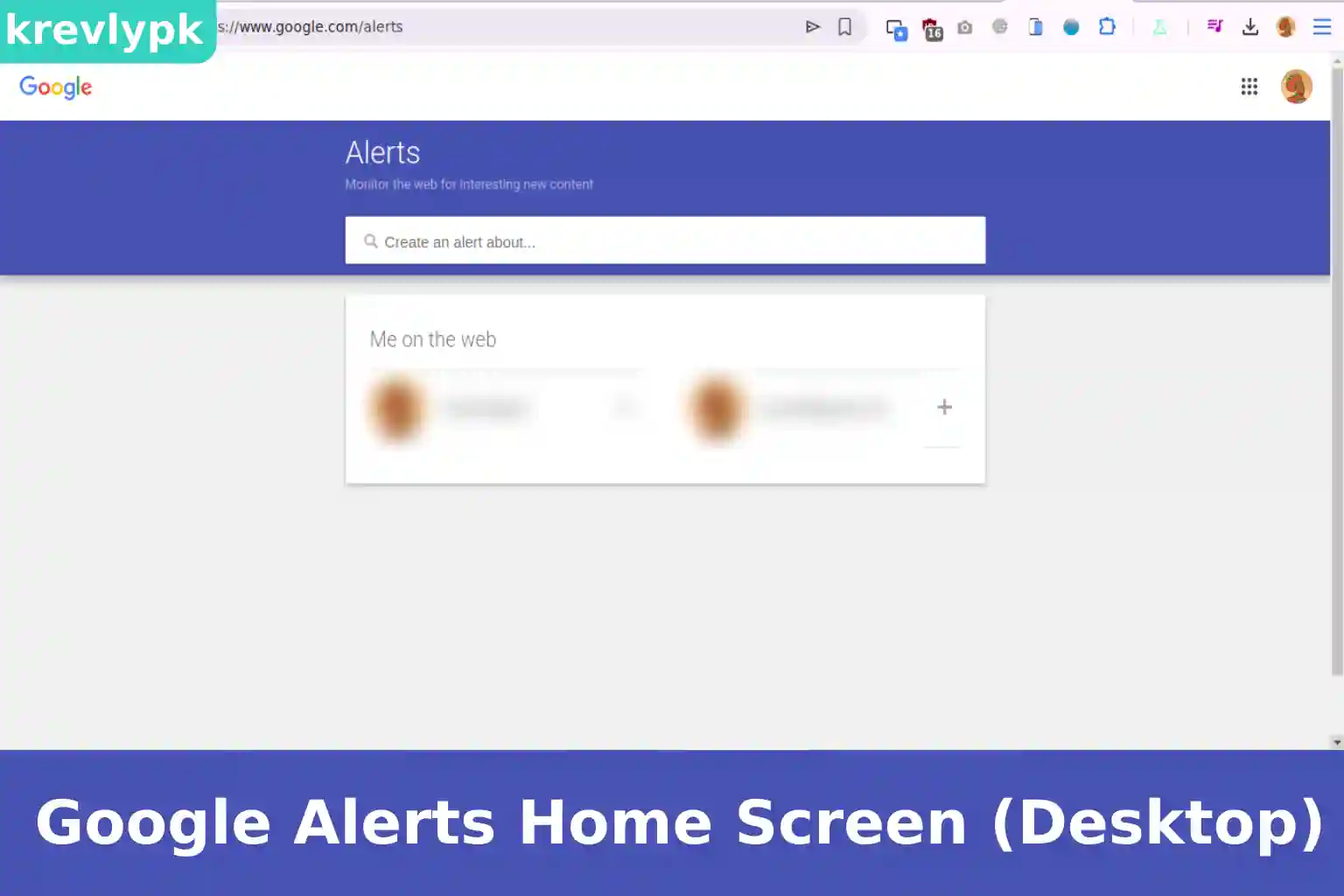
Open Google Alerts
Open your browser and go to alerts.google.com
You’ll see a simple search bar at the top with the text “Create an alert about…” and a preview section below it.
You must be signed into a Google account. If you use Gmail, you’re already set. If not, create a free Google account first — it takes two minutes.
STEP 2
Type Your First Alert Keyword
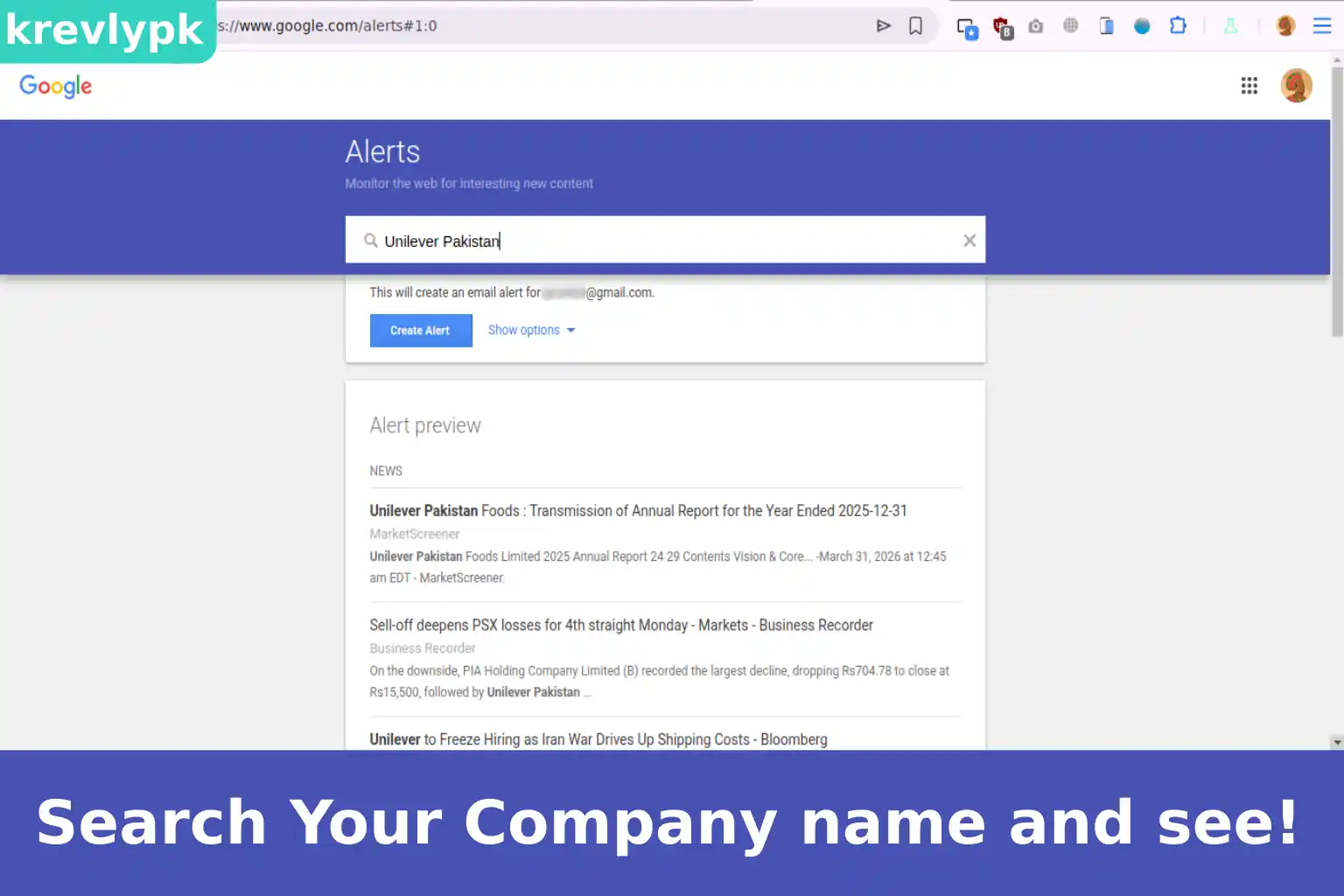
Click inside the search bar and type the name of the company you want to track. e.g. Unilever Pakistan
As soon as you start typing, Google shows you a live preview of recent results below. This tells you: Google is already indexing content about this company.
Don’t press Enter yet. You need to customize the settings first.
STEP 3
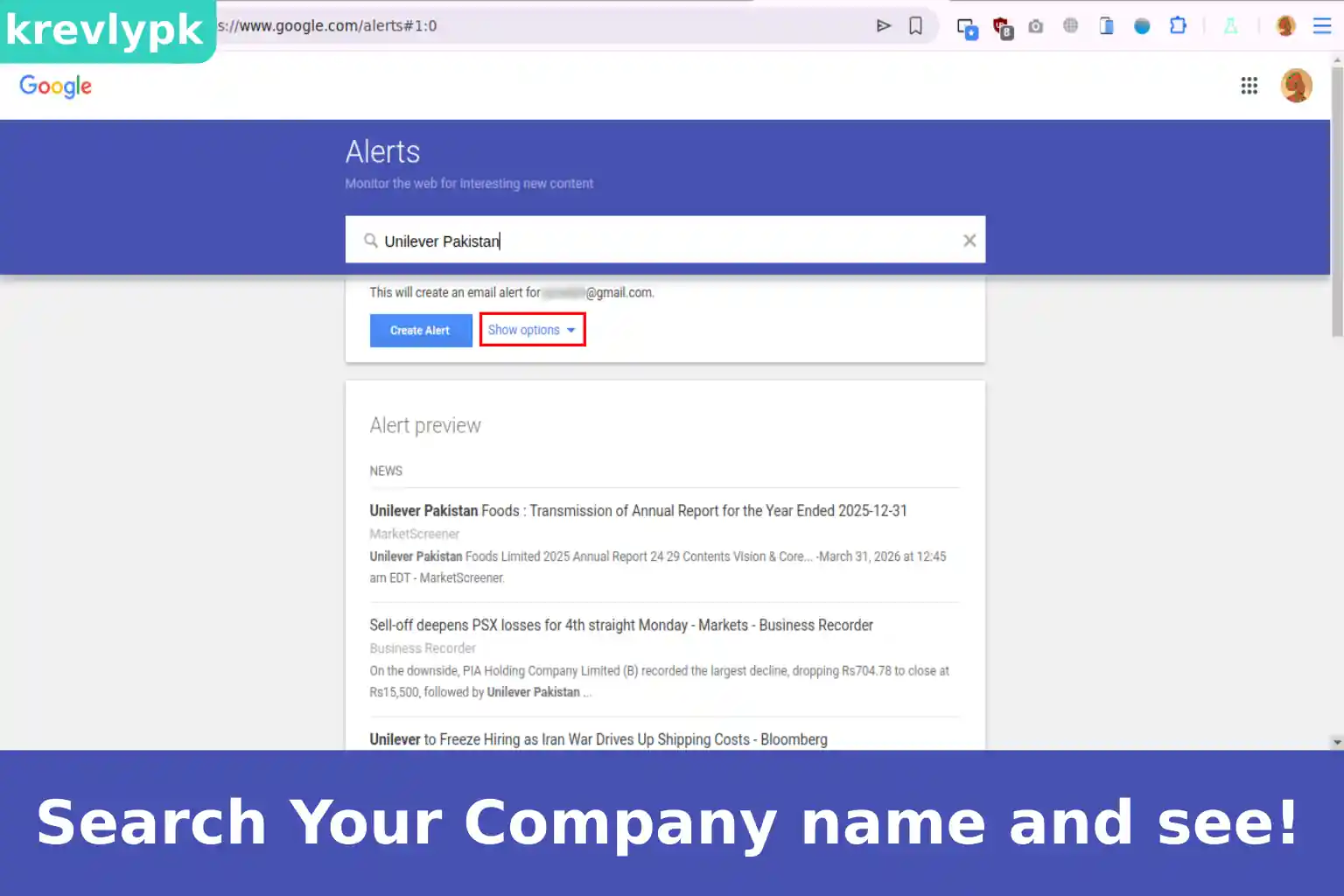
Click Show Options
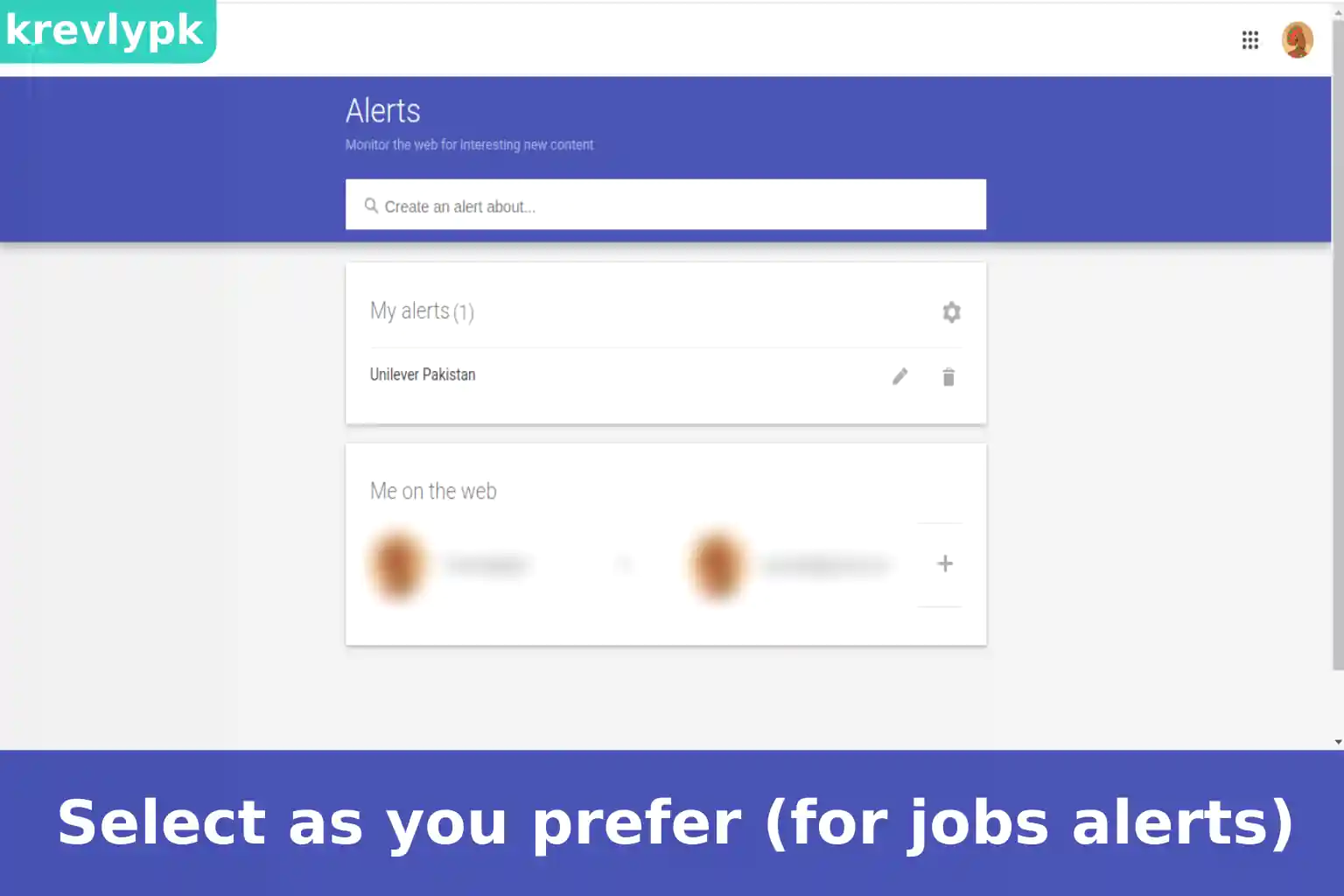
Once your settings are configured, click the blue Create Alert button.
That’s it. Your alert is live. Google will now monitor the internet for any mention of your keyword and email you a digest once a day.
STEP 4
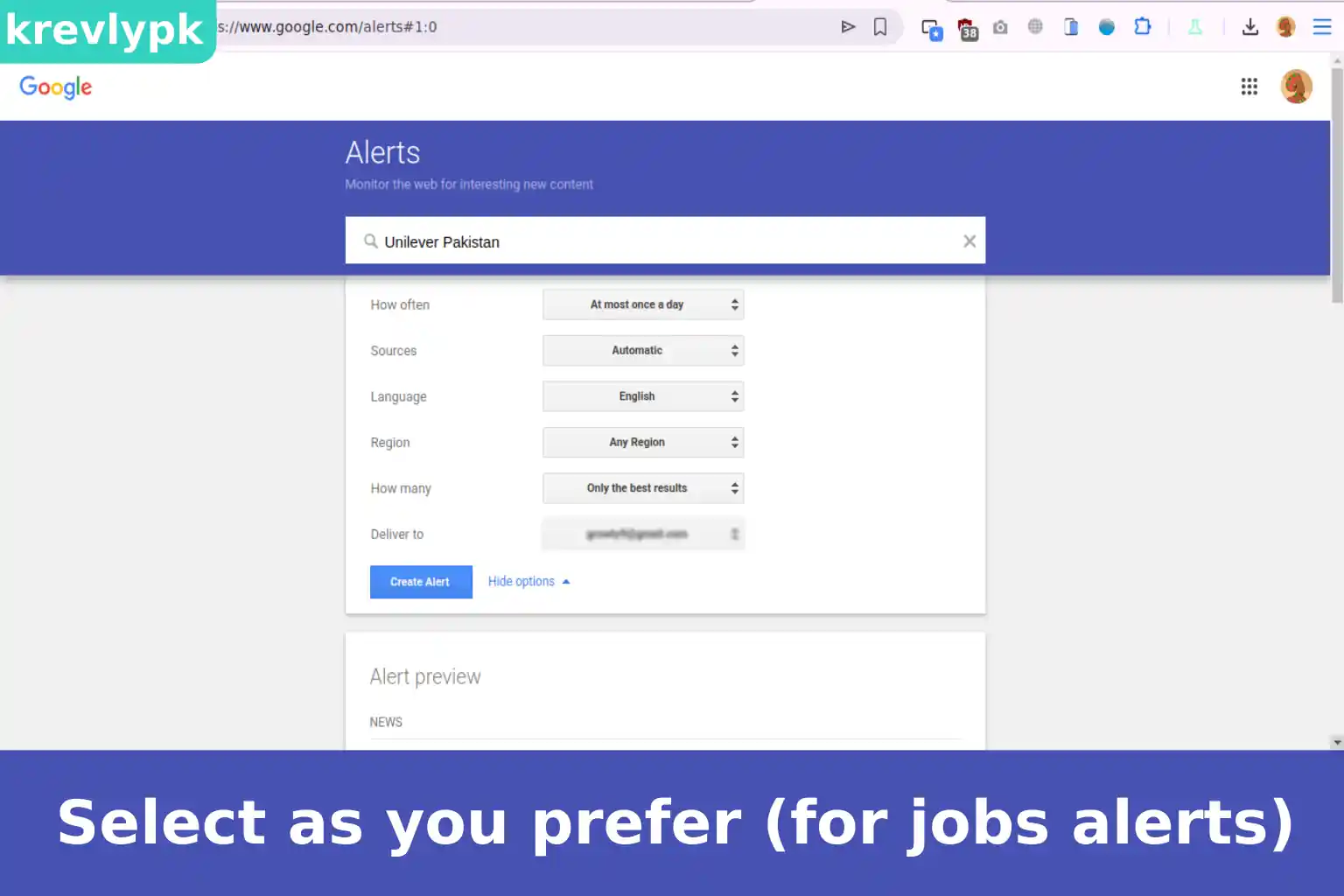
Configure Your Alert Settings
You’ll see five settings. Here’s exactly what to choose for job hunting:
Setting | What to Select |
How often | Once a day |
Sources | Automatic |
Language | Preferred by you |
Region | Your Target Country |
How many | All results |
Deliver to | Your Email Address |
How to Use Search Engines for Advanced Job Research 2026
From My Experience Three years ago I was sitting with a fresh graduate in a …
Read Full GuideLets Dive Deeper into Step 4
Choose Once a day. Getting an alert every time something is published will flood your inbox and you’ll start ignoring it. Once a day gives you a clean morning digest.
Leave on Automatic. This covers news, blogs, web, and more.
Set this to Pakistan. Otherwise you’ll get alerts about Unilever Nigeria, Unilever Brazil, and every other country that has nothing to do with your job search.
Select “All results” not “Only the best results.” Best results filters too aggressively and you might miss smaller job announcements.
Use the email address you created specifically for job applications. Keep your job search information organized in one place.
STEP 5
Click Create Alert
Just below the search bar, you’ll see a small blue text that says Show options. Click it.
A set of dropdown menus will appear. This is where most people skip too fast. These settings determine whether your alerts are useful or useless.
You’ll see your new alert appear in the “Your alerts” list below the search bar.
STEP 6
Create Multiple Alerts (The Right Way)
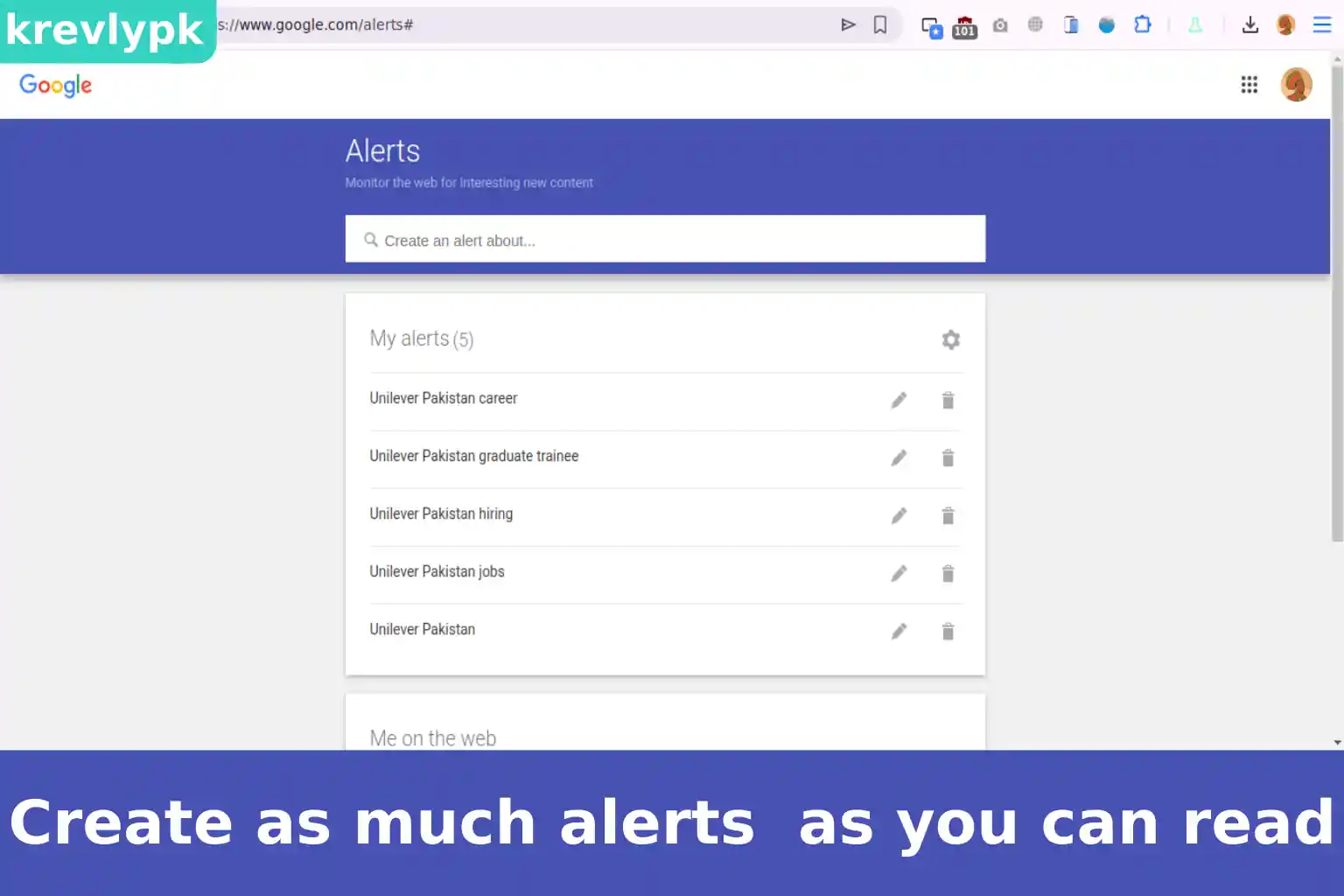
One alert is not enough. Here’s the complete set of alerts every fresh graduate should create for each target company:
Lets Dive Deeper into Step 6
Unilever Pakistan Tracks all general mentions: news, announcements, press releases.
Unilever Pakistan jobs Catches job postings and hiring announcements specifically.
Unilever Pakistan hiring Many companies announce hiring drives on their blogs or social pages using this word.
Unilever Pakistan graduate trainee Fresh graduates should specifically track entry-level opportunity language.
Unilever Pakistan career Catches career fair announcements, campus recruitment, and career page updates.
Repeat this for every company on your target list. If you have 10 target companies, you’ll have approximately 40-50 alerts. That sounds like a lot. Your inbox won’t explode — remember, you set it to once a day, and Google bundles everything into one clean email.
Pro Tip:
Use quotation marks around your keyword phrase. Typing Unilever Pakistan without quotes might return results about “Unilever” and “Pakistan” separately, catching irrelevant content. Typing Unilever Pakistan tells Google to find that exact phrase together. Much more accurate results.
Advanced Alerts: Going Beyond the Company Name
Once you’ve set up company-specific alerts, add these broader alerts to complete your intelligence system:
FMCG Pakistan hiring 2026, advertising agency Karachi jobs, and software house Lahore hiring. These catch opportunities at companies you haven’t even thought of yet.
marketing executive Pakistan, fresh graduate accountant Karachi, and business analyst trainee Pakistan. These find job postings that mention your exact target role.
If Unilever is your dream company, set up alerts for Procter & Gamble Pakistan, Nestlé Pakistan, and Reckitt Pakistan too. Companies in the same industry hire on similar timelines and require similar skills.
How to Use Alert Emails When They Arrive
Getting the alert is step one. Using it correctly is where most people drop the ball.
Don’t just apply immediately with your generic CV. Take 20 minutes to read the posting carefully, customize your resume with the job’s keywords, and write a specific cover letter. Applying within 24-48 hours of a posting going live puts you in the first wave of applicants — before the pile gets overwhelming for HR.
Read it. Save it. Use it. A new product launch, a new market expansion, a new leadership hire — these are conversation starters in interviews. Mentioning “I read about your recent expansion into Multan” in an interview tells the panel you’re genuinely interested, not just sending CVs everywhere.
Use it as a reason to reach out. Find the relevant HR person or hiring manager on LinkedIn. Send a short note: “Congratulations on the award — I’ve been following your company’s growth and would love to be considered for opportunities as they arise.” Not pushy. Just visible.
Don’t ignore it completely. Sometimes an article about a company’s financial results tells you they’re growing — which means they’re probably hiring. Read between the lines.
Warning:
Never set up Google Alerts and then ignore the emails. That’s worse than not setting them up at all — because you’ll feel like you’re doing something when you’re actually doing nothing. Block five minutes every morning to scan your alert digest. Treat it like a daily briefing. Consistent attention compounds over weeks into real opportunities.
Managing Your Alerts: Keeping Things Clean
After a few weeks, some alerts will prove useless and others will become essential. Here’s how to manage them properly.
Go back to alerts.google.com. You’ll see your full list. Click the pencil icon next to any alert to change the keyword, frequency, or settings.
Click the trash icon next to any alert you no longer need. If a company stops being a target, remove the alert. A cluttered alert system is as useless as no system at all.
You can unsubscribe from alert emails temporarily using the link at the bottom of any alert email, then reactivate later. Useful if you’re traveling or taking a short break from job hunting.
The Alert System That Actually Gets Results
After a few weeks, some alerts will prove useless and others will become essential. Here’s how to manage them properly.
| Alert Type | Example | Purpose |
|---|---|---|
| Company name | “Nestlé Pakistan” | General monitoring |
| Company + jobs | “Nestlé Pakistan jobs” | Job postings |
| Company + hiring | “Nestlé Pakistan hiring” | Hiring announcements |
| Company + your role | “Nestlé Pakistan marketing” | Role-specific openings |
| Industry + location | “FMCG Lahore hiring” | Broader opportunities |
| Your target role | “brand management trainee Pakistan” | Any company, right role |
Set this up for your top 10 target companies. Update the list every month. Remove companies that have gone quiet. Add new ones as your research evolves.
Final Words
Google Alerts won’t get you a job by itself. Nothing will. But it gives you something most job seekers in Pakistan don’t have: consistent, real-time intelligence about the companies you want to work for. While everyone else is refreshing Rozee.pk and hoping, you’ll be reading morning briefings about your target companies, applying to jobs within hours of posting, and walking into interviews with specific knowledge that makes panels sit up and pay attention.
Set up your alerts today. Not tomorrow. Today.

Noman Durrani
Leave a Comment