
From My Experience
I once spent an entire weekend building a CV that looked like a piece of art—full of custom graphics, skill bars, and a complex three-column layout. I was so proud of it that I sent it to ten top companies, expecting my phone to ring within the hour.
I got nothing but silence for weeks.
In today’s competitive era, everyone job seeker is frustrated about “Why is their CV got rejected automatically?”. You spend hours for crafting a unique piece for art as CV but when you apply for job. You receive an automated mail ” We got your details we will soon contact you”. After this complete silence you check your mail every hour but nothing.That’s exactly happening with 80% of job seekers in a report from published by LinkedIn in 2024.
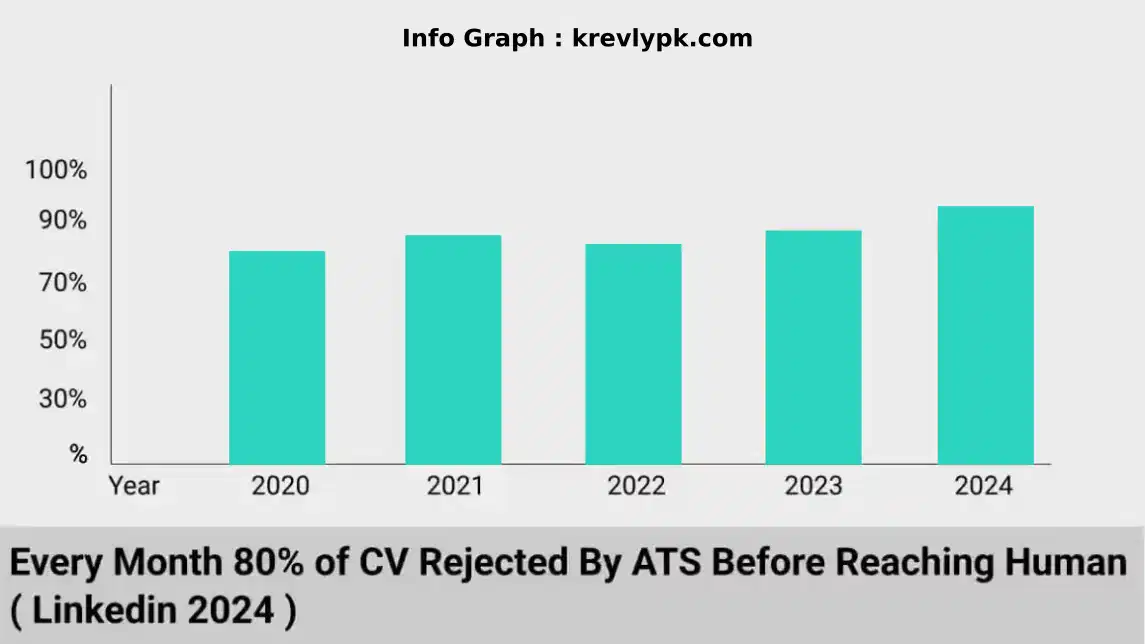
If you are wondering what is ATS. The full form of ATS is Applicant Tracking System. This software is by all companies around the world. This software that analyzes resumes before human eyes ever see them. In today’s competitive job market, understanding these invisible gatekeepers isn’t just helpful—it’s essential.
Resume Green Zones: Safe Moves for Success
These are the practical steps you should always take to ensure the bot likes you:
Read the job post and pick out the 5 most important skills (like “WordPress,” “SEO,” or “Project Management”). Use these exact words in your “Skills” section. If the bot is looking for “JavaScript” and you wrote “Coding,” it might skip you.
Stick to basics: “Experience,” “Education,” and “Skills.” Creative titles like “My Journey” or “Where I’ve Been” confuse the ATS. It needs to know exactly which box to put your info in.
Real Story:
I once mentored a brilliant developer in Lahore who had a 4-page CV filled with heavy graphics and custom icons. He applied for 50 jobs and got zero replies. We spent 15 minutes stripping it down to a clean, single-column layout with standard headings. Within a week, he had three interviews. The talent was there; the “translator” (his CV) was just broken.
Unless the job post specifically asks for a .doc file, use a PDF. It preserves your layout so the text doesn’t shift when the ATS tries to read it.
The “Red Zones”: Why the Bot Deletes You
These look “fancy” to humans but are high-risk for automated systems:
Many ATS bots read from left to right, like a human. If you have two columns, the bot might read line 1 of column A and then line 1 of column B together, creating a jumbled mess of words that makes no sense.
Never put your skills inside a graphic (like a “80% Progress Bar”). The bot cannot “see” images; it only reads text. If your best skills are inside a picture, the bot thinks you have zero skills.
Some people try to hide keywords in white font at the bottom of the page to trick the bot. Modern ATS software flags this as “keyword stuffing” and will automatically blacklist your application for being “spammy.”
Stick to Arial, Calibri, or Roboto. Exotic fonts often fail to “embed” in the file, appearing as strange symbols or empty boxes when the recruiter finally opens the document.
Gray Areas: The Human-Bot Balance
If you are applying for a Graphic Design role, a fancy CV is expected. However, for 90% of other jobs, a simple layout is better. If you use Canva, ensure the text is “selectable” and not saved as a flat image.
In Pakistan, photos are common, but in some international markets (like the US or UK), they can trigger an auto-rejection due to “unconscious bias” laws. Always check the company’s location before including your picture.
The Rise of Automated Screening
When I first entered the recruiting industry fifteen years ago, every resume crossed a human’s desk. Today, up to 75% of resumes are rejected by algorithms before reaching a recruiter. Companies simply don’t want to invest money into real humans who they analyze 100 of CV. They prefer to use ATS.
All of these ATS system look for specific keywords, education and layout of CV. if you have skills and you are talented but your CV lack those specific things that ATS is looking for. You will be filtered and rejected.
Common Reasons Your Resume Gets Auto-Rejected
Missing keywords in CV is most common reason that your resume never pass computer check. Each job post require specific things like education, skills, experience or may be location. When your resume doesn’t mirror these critical terms, the ATS assumes you’re not qualified.
Formatting issues like complex design, complex tables, too much heavy editing, unusual fonts can cause ATS problem to understand and it will think you are not suitable for this job. There multiple candidates i have met them who failed because their CV not passed ATS even they were suitable for that job.
How to resolve ATS resume checker
Well, its pretty easy to solve. After reading this post i think you understand what ATS is and how it works. Now you know to tackle this up.
Analyze Jobs Carefully
You must start by analyzing each job descriptions carefully. Highlight specific skills, qualifications, and experiences mentioned, then thoughtfully insert these terms into your resume in right way.
Why is it important to dress for success at a job interview?
From My Experience Early in my career, I went to an interview wearing a shirt …
Read Full GuideRight Format of CV
Make sure your CV is appealing for human but still its simple enough that ATS can understand it. Use standard section headings, clean fonts, and straightforward layouts that scanning software can easily interpret.
Every Job is different so needs too?
Yes! each company have different requirement. You must need to tweak your CV for each and every job. I can give you an idea you can make a canva or inkscape template of your CV. You can edit any info at any time. This will save a lot of time.
Make it human friendly too
For sure your resume will be then transferred to HR. So, what this means we need to make it human friendly too. Balance keyword optimization with authentic storytelling. Quantify achievements where possible. Instead of simply listing responsibilities, showcase results—numbers, percentages, and specific outcomes that demonstrate your impact.
The next time you apply for a position, remember: That you’re writing for two audiences—the ATS that controls access and the recruiter who controls opportunity. Address both effectively, and those automated rejections will gradually transform into interview invitations.
Mistakes & their Solutions
Mistake (Don’t)
Complex graphics & bars
Multi-column layouts
Invisible “white” keywords
Fancy, exotic fonts
Skills hidden in images
Generic “one-size” CV
Solution (Do)
Use plain, readable text
Stick to a single column
Natural keyword placement
Standard fonts (Arial/Calibri)
Type skills in a list
Tailor keywords for each job
A winning CV isn’t about the design you add, but the clarity the bot can read.

Noman Durrani